Online Shopping Part 2 - Taobao & Returns

Why Taobao When You've Got Pinduoduo?
In the last chapter, we covered Pinduoduo - your go-to for dirt-cheap everyday essentials and random nick-nacks you didn't even know existed. But China's e-commerce ecosystem isn't one-size-fits-all, and that's where Taobao comes in.
Think of it this way:
Pinduoduo: Your local discount warehouse. Great for bulk buys, household items, and when you want the absolute cheapest price.
Taobao: More like Amazon or eBay. Better for branded items, more variety, better quality control, and - crucially - a smoother returns process.
You'll want Taobao when you're buying:
Clothing and shoes (where sizing matters)
Branded electronics
Items where quality and authenticity are important
Anything you might need to return
My Taobao Return Story: The 5XL Shirt That Was Still Too Big
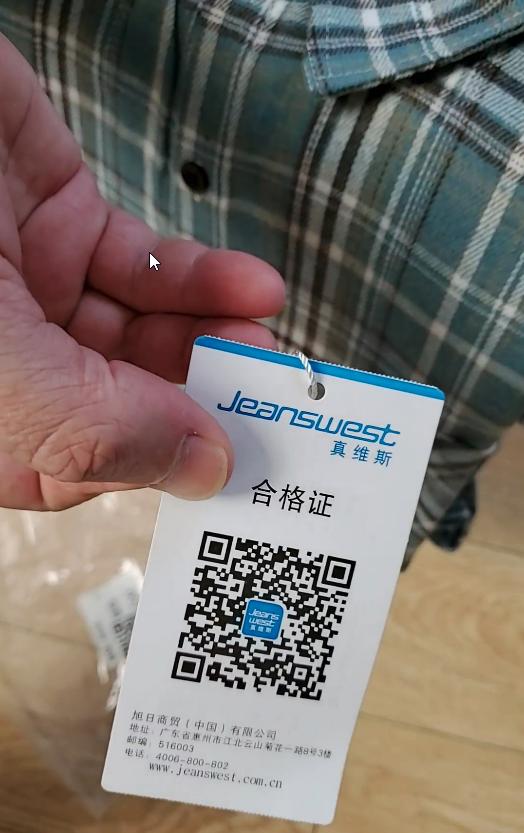
I ordered a plaid shirt from Jeanswest on Taobao - size 5XL, because sizing in China runs smaller than Western sizing. It arrived, I tried it on, and... it was too big. Time for a return.
Here's the thing that blew my mind: the entire return process took about 10 minutes, was completely free, and my refund was virtually instant. Not 7-10 business days. Not "processing your refund." Instant.
Step 1: Access Your Taobao Orders
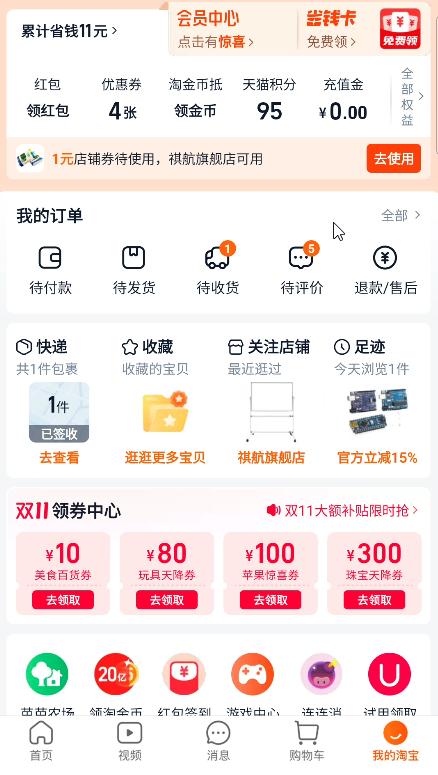
When you log into Taobao, you'll see your account dashboard. Look for these key sections:
待付款 (Pending Payment): Orders you haven't paid for yet
待发货 (Pending Shipment): Orders paid but not shipped
待收货 (Pending Receipt): Orders on their way to you
待评价 (Pending Review): Orders delivered and waiting for your review
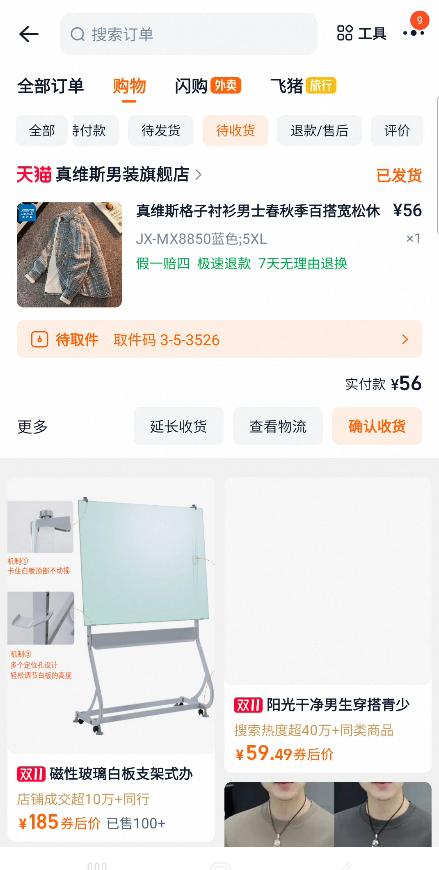
退款/售后 (Refund/After-Sales): This is where returns happen
Tap on 退款/售后 to see your return and refund options.
Step 2: Find Your Order
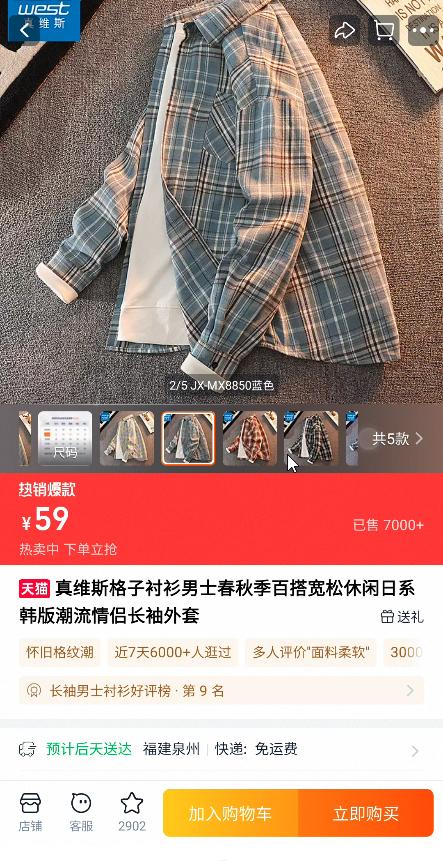
Find the order you want to return in your "已收货" (Received) or "待评价" (Pending Review) section. My shirt listing looked like this: ¥59 (about $8 USD). I actually got it for ¥56 with a discount. Notice the seller is 天猫 (Tmall), which is Taobao's premium marketplace for verified brands and official stores. Tmall listings generally have better return policies than regular Taobao sellers.
Step 3: Initiate the Return
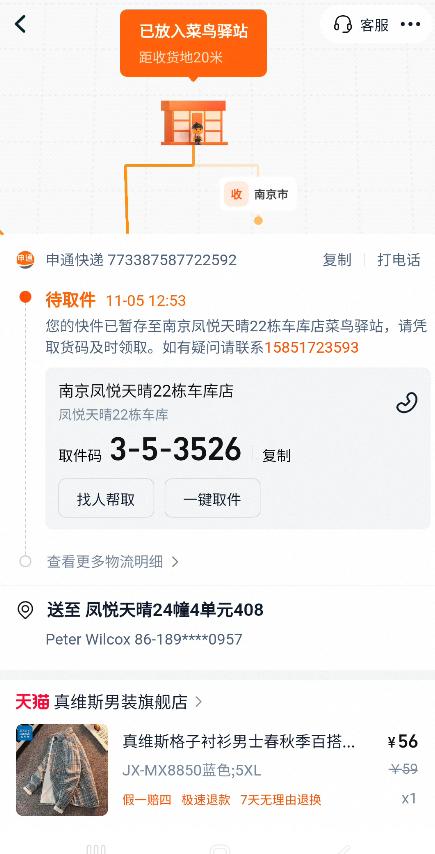
Once you start the return process, Taobao generates a return code for you. Mine was 3-5-3526. This code is crucial - it's how the pickup point or courier will identify your return package.
You'll see it displayed prominently along with:
The pickup location details
The return tracking information
A phone number if you need to call
Pro Tip: Screenshot this page! You'll need the return code when you drop off the package.
Step 4: Choose Your Return Type
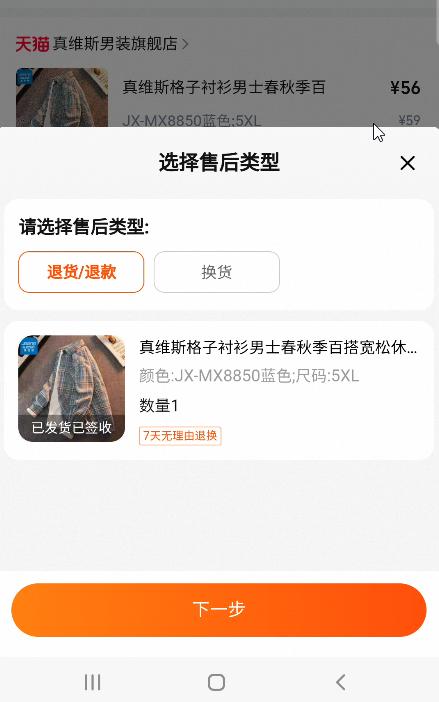
Taobao gives you two options:
退货/退款 (Return & Refund): Send the item back and get your money
换货 (Exchange): Swap for a different size/color/version
Since my shirt was too big and I wasn't sure what size would fit, I chose 退货/退款 (Return & Refund). Tap the orange button 下一步 (Next Step) to continue.
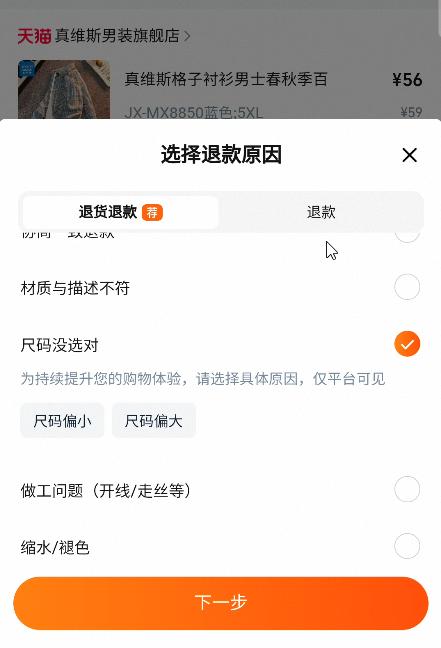
Step 5: Select Your Return Reason
Now Taobao wants to know why you're returning. The options include:
不想要了 (Don't want it) - with "7天无理由退换" (7-day no-questions-asked return) tag
尺码没选对 (Wrong size selected)
做工问题 (Workmanship issues/defects/poor quality)
缩水/褪色 (Shrinkage/color fading)
少件 (Missing items/accessories)
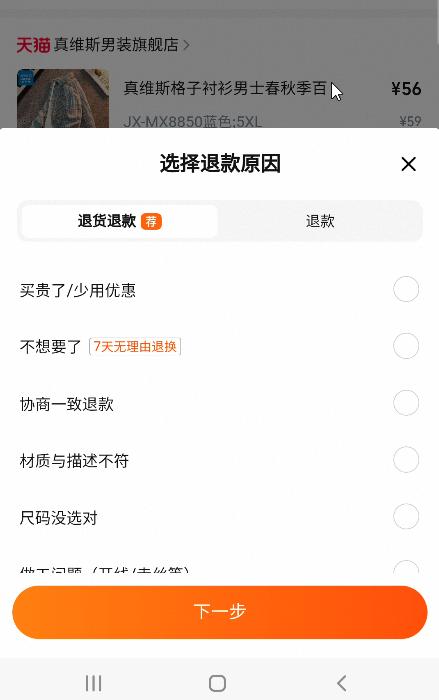
Since my issue was sizing, I selected 尺码没选对 (Wrong size). The system then asks whether it's:
尺码偏小 (Size too small)
尺码偏大 (Size too big)
I tapped 尺码偏大 (Size too big) because, well, it was too big. Tap 下一步 (Next Step) once you've made your selection.
AI Assistant Pro Tip: If you're unsure which reason to select or what the Chinese text says, take a screenshot and ask ChatGPT: "I'm trying to return an item on Taobao. Can you translate these return reason options and tell me which one I should select if [explain your situation]?" Works like a charm.
Step 6: Confirm Return Details
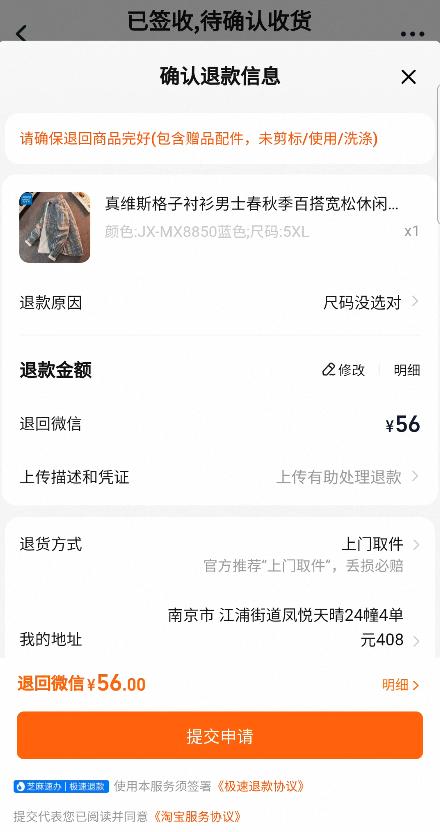
This is your return confirmation screen. Here's what it shows:
退款原因 (Return Reason): 尺码没选对 (Wrong size)
退款金额 (Refund Amount): ¥56
退回微信 (Refund to WeChat): ¥56
退货方式 (Return Method): 上门取件 (Door pickup) - this is the default
Notice the orange button at the bottom: 提交申请 (Submit Application).
Step 7: Choose Your Return Method
This is where Taobao really shines. You get multiple return method options:
上门取件 (Door Pickup) - Recommended by Taobao
寄件点自寄 (Self-Send from Service Point)
快递柜寄件 (Express Locker)
自行寄回 (Send Back Yourself)
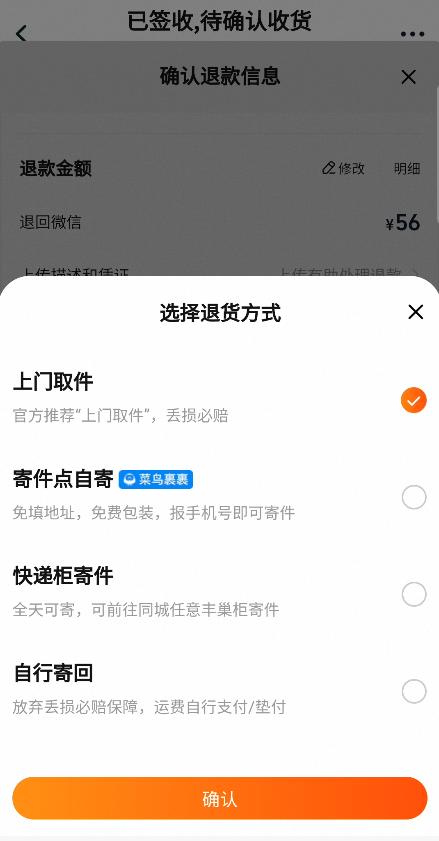
I selected 自行寄回 (Self-drop-off) because the pickup point is literally a 2-minute walk from my apartment - it's the same place where I pick up my regular deliveries. Why wait around for someone to pick it up when I can drop it off on my own schedule?
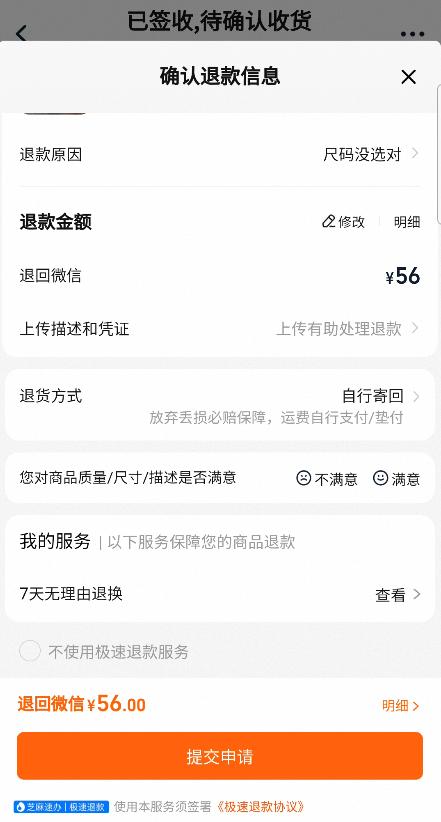
The screen now shows:
退货方式: 自行寄回 (Self-drop-off)
我的服务: 7天无理由退换 (7-day no-questions-asked return policy)
退回微信 ¥56.00 (Refund to WeChat: ¥56.00)
Tap the orange 提交申请 (Submit Application) button to finalize.
Step 8: Drop Off Your Package
After submitting your return request, you'll see the drop-off location details:
Location: Nearby pickup point
Hours: 09:30-21:00
Distance: Usually very close
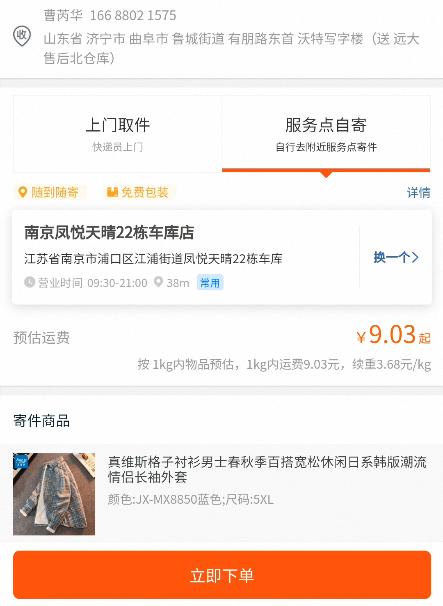
Now here's what you actually do:
Pack the item with all original tags and packaging (if you still have it)
Write your return code (mine was 3-5-3526) clearly on the package, or show it on your phone to the staff
Walk to the pickup point during their operating hours
Hand it to the staff - they'll scan your return code
Done! Walk away and wait for your refund
That's it. No paperwork. No printing labels. No waiting for email confirmations.
The Refund: Virtually Instant
Here's what blew my mind coming from Western e-commerce: my refund hit my WeChat account within about 10 minutes of dropping off the package. Not days. Not "5-7 business days pending inspection." Just... instant.
The pickup point staff scans your return, it registers in the system, and Taobao processes the refund immediately. You'll get a notification on your phone, check WeChat Pay, and the ¥56 is already back in your account.
Compare this to:
Amazon in the US: 5-10 business days after they receive the return
Australian retailers: Often 7-14 business days
Many European platforms: Up to 14 days
China's instant refund system is something you'll get spoiled by. Returning to slower Western systems will feel painfully archaic after this.
Pro Tips for Taobao Returns
Always Keep the Tags On
Until you're 100% sure you're keeping an item, don't remove tags. Many sellers require original tags for returns, and Tmall's 7-day return policy requires them.
Use the Pickup Points
Unless you're home all day, the self-drop-off option is superior to door pickup. You control the timing, it's usually very close by, and you don't have to wait around for a courier.
Screenshot Your Return Code
The return code is your golden ticket. Screenshot it, save it, and show it to the pickup point staff. Some locations might ask for it on your phone rather than written on the package.
Take Photos Before Returning
Snap a few photos of the item you're returning, especially if there's a quality issue. This protects you if there's any dispute. Taobao's system heavily favors buyers, but documentation never hurts.
Use AI for Translation
If you get stuck on any of the Chinese return screens, just screenshot it and paste it into ChatGPT or Claude with a prompt like: "I'm trying to return an item on Taobao. What does this screen say and what should I click?" Honestly, this is a game-changer for navigating Chinese apps.
Check the Return Policy Before Buying
Look for the 7天无理由退换 (7-day no-questions-asked return) badge on listings. Tmall sellers usually have this, but some smaller Taobao sellers might have stricter policies.
Time Your Drop-Off
Pickup points can get busy during peak hours (lunch time, early evening). If you want to avoid queues, drop off your return mid-morning or mid-afternoon.
Troubleshooting Common Return Issues
"The app is asking me to provide photos"
Some returns (especially for quality issues) require you to upload photos of the defect. Use your phone camera, take clear photos, and upload directly in the return process.
"My return request was rejected"
This is rare but can happen if you removed tags, damaged the item, or are outside the return window. Contact the seller through Taobao's chat function. Use Google Translate or AI to communicate.
"I can't find the return option on my order"
The return option typically appears after you've confirmed receipt. If you confirmed receipt more than 7 days ago, you might be outside the return window for some sellers. Check the seller's specific return policy.
"My refund didn't arrive instantly"
While most refunds are instant, some sellers (especially smaller non-Tmall stores) might require manual review. Give it 24 hours. If still nothing, contact Taobao customer service through the app.
"The app is entirely in Chinese and I'm lost"
Open Google Lens or Google Translate's camera function and point it at your screen. It'll translate the text in real-time. Alternatively, screenshot each step and ask ChatGPT or Claude to walk you through it. Trust me, thousands of foreigners navigate Taobao daily without knowing Chinese - you've got this!
Taobao vs. Pinduoduo: When to Use Which
Now that you've seen both platforms in action, here's my guide for choosing between them:
Use Pinduoduo for:
Groceries and fresh food
Household essentials (toilet paper, cleaning supplies)
Everyday items you buy repeatedly
When you want the absolute cheapest price
Group buying deals with friends or family
Use Taobao for:
Clothing and shoes (better return process)
Branded items and electronics
Items where quality matters more than price
Anything you might need to return or exchange
When you want more product variety and seller ratings
Use Both:
Compare prices! The same item can vary significantly between platforms
Pinduoduo for your weekly groceries, Taobao for everything else
Check both for big purchases - you might find better deals on one over the other
Final Thoughts: Returns Made Easy
Coming from Western e-commerce, China's return system feels almost too good to be true. Free returns, instant refunds, convenient pickup points open until 9 PM - it's the kind of customer service that spoils you for life.
The key takeaway? Don't be afraid to order online in China. Even if something doesn't work out, you can return it in 10 minutes with zero hassle. No more anxiety about "What if it doesn't fit?" or "What if I don't like it?" Just order it, try it, and if it's wrong, return it.
Between Pinduoduo's rock-bottom prices and Taobao's hassle-free returns, you've now got China's e-commerce ecosystem figured out. Your wallet is about to get very happy, and your apartment is about to get very full of cheap, convenient deliveries.